NP Age Verification Suite 1.2.4 Install Guide
A practical, screenshot-driven setup walkthrough for the complete age verification suite on PrestaShop 8 and 9 — covering gate configuration, verification methods, layout modes, themes, GeoIP, per-product age tiers, checkout enforcement, audit log, analytics, and accessibility.
Package
Use np_ageverify-1.2.4.zip for PrestaShop 8.x and 9.x stores.
What you get
Four verification methods, six premium themes, five layout modes, GeoIP country rules, per-category and per-product age tiers, checkout blocking, immutable audit log with CSV export, analytics dashboard, anti-bruteforce rate limiting, EN/ES translations, WCAG 2.1 AA accessible UI.
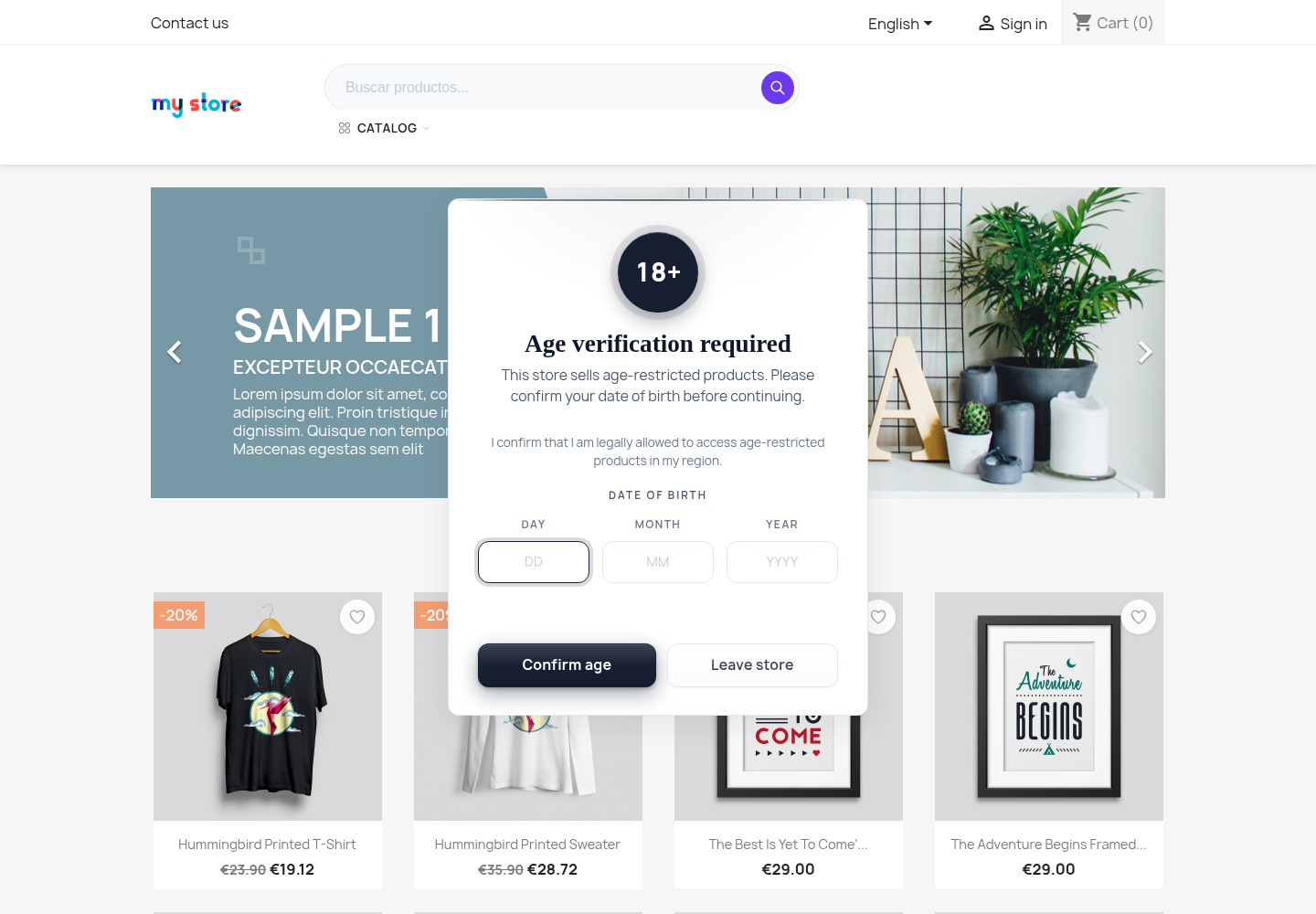
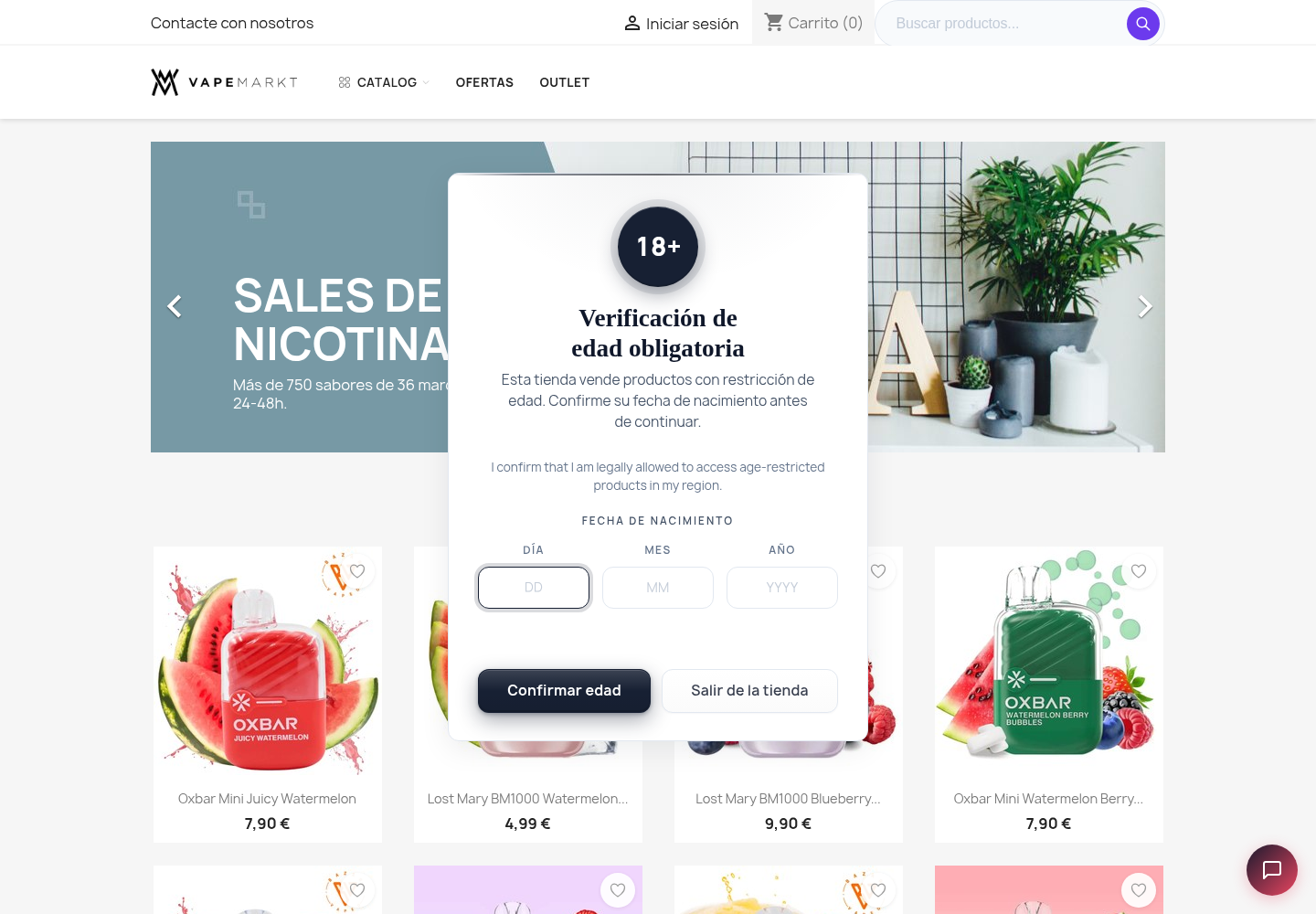 Default Date-of-birth gate on a PrestaShop 9 storefront — center modal layout, minimal theme, premium typography and refined badge.
1. Package File
- Package:
np_ageverify-1.2.4.zip - Platform: PrestaShop 8.x (8.0.0+) and PrestaShop 9.x (9.0.0+)
- PHP: 7.4, 8.1, 8.2, 8.3+
- SHA256:
e5b33cee145ce7c21c9ebd5507fd31c1913f3fe4250f2cf5e3729fe7b2a9ca00 - Download: available from the product page after purchase; direct release file for verification is https://neuroplugin.com/downloads/np_ageverify-1.2.4.zip
shasum -a 256 np_ageverify-1.2.4.zip on macOS / Linux or certutil -hashfile np_ageverify-1.2.4.zip SHA256 on Windows and compare against the SHA256 published on the product page.
2. Install Steps
Open Module Manager
Log in to your PrestaShop back office and go to Modules → Module Manager.
Upload the ZIP
Click Upload a module, drop in np_ageverify-1.2.4.zip, and wait for PrestaShop to confirm the install.
Configure the gate
Click Configure on the NP Age Verification Suite card. You land on the Settings tab — three tabs total: Settings, Audit log, Analytics.
Hit a storefront page
Open any product page in an incognito window. The gate appears immediately — verify it shows the minimum age you configured (default 18).
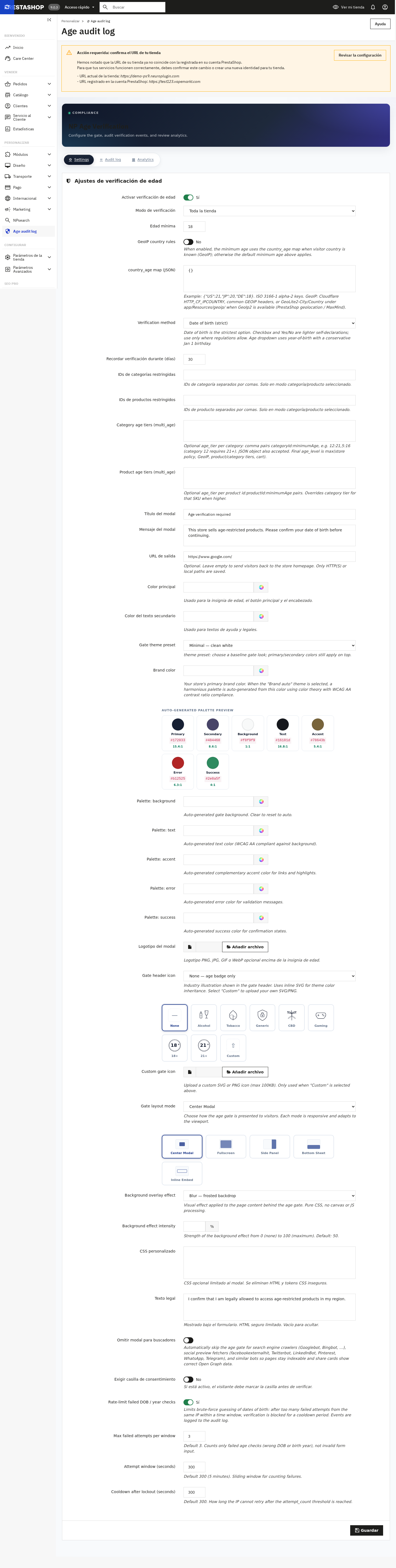 Back-office Settings tab — premium card layout grouped into Gate behaviour, Look & feel, and Storefront copy. Pill-style sub-tabs at the top.
3. First Configuration
The Settings tab is divided into clear sections. Walk through them top-to-bottom on first install.
4. Verification Methods
Pick the method that matches your jurisdiction and audience tolerance. You can change it at any time without losing audit history.
| Method | Best for | UX impact |
|---|---|---|
| Date of birth | Strict regulators (alcohol, firearms) | Three small inputs, autocompleted on mobile |
| “I am 18+” checkbox | Light-touch verticals where a declaration is accepted | Single tap-and-go |
| Yes / No buttons | Stores prioritising conversion over compliance theatre | Two large buttons, fastest to clear |
| Birth-year dropdown | Mid-strictness — captures year without month/day friction | One styled select, mobile-friendly |
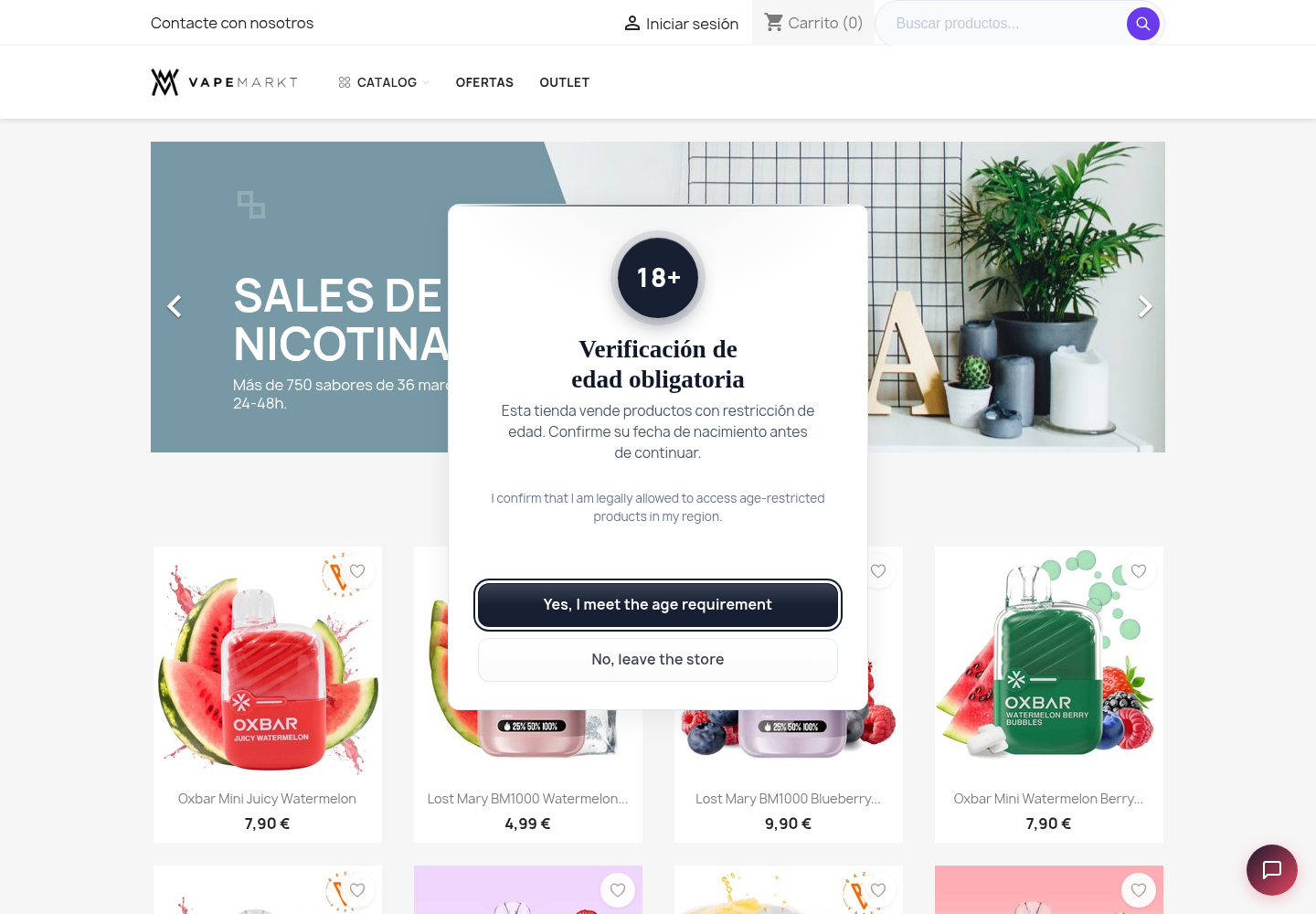 Method: Yes / No buttons — fastest to clear, two large primary actions, one-tap conversion path.
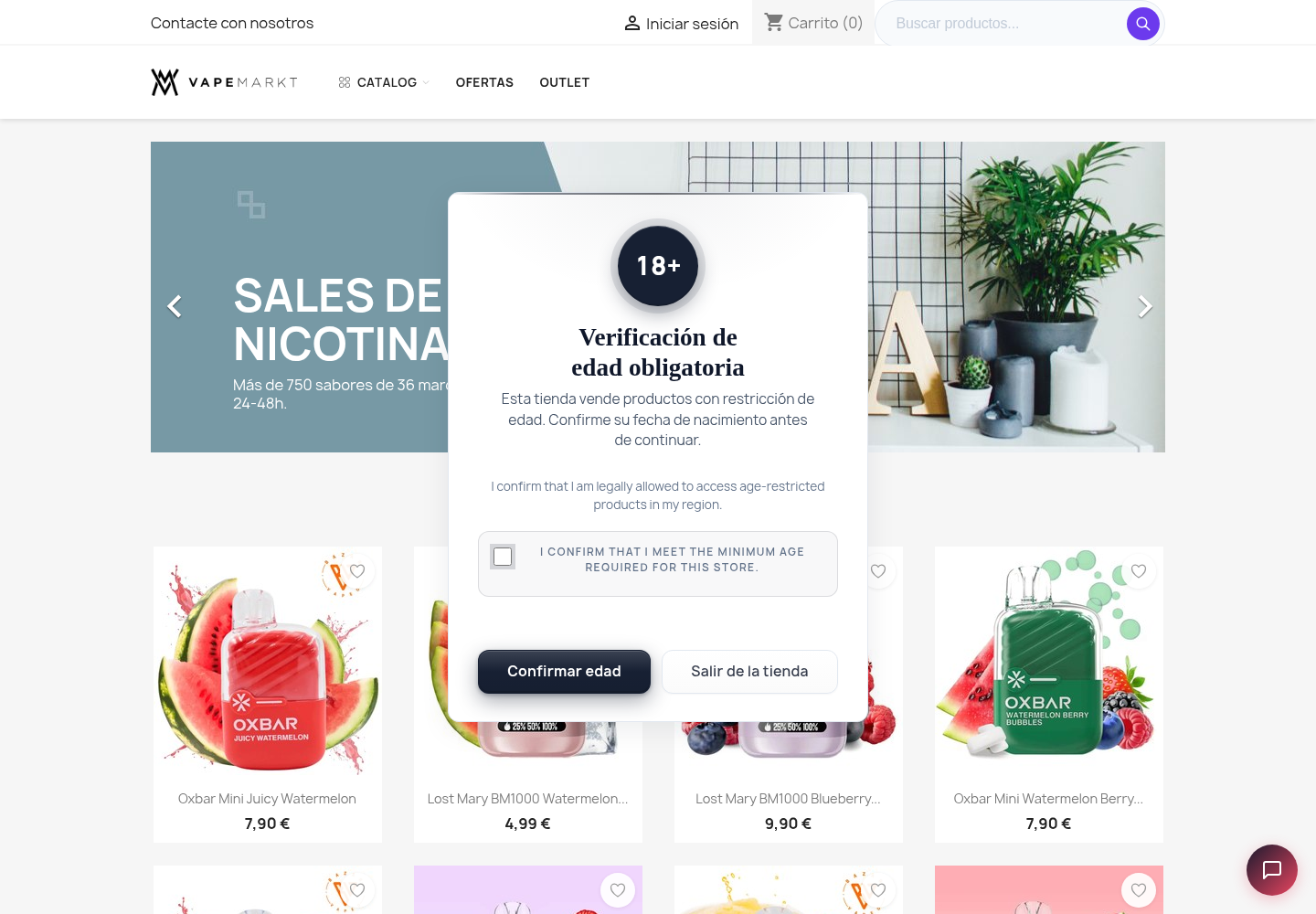 Method: “I am 18+” checkbox — single acknowledgment box, ideal for light-touch verticals.
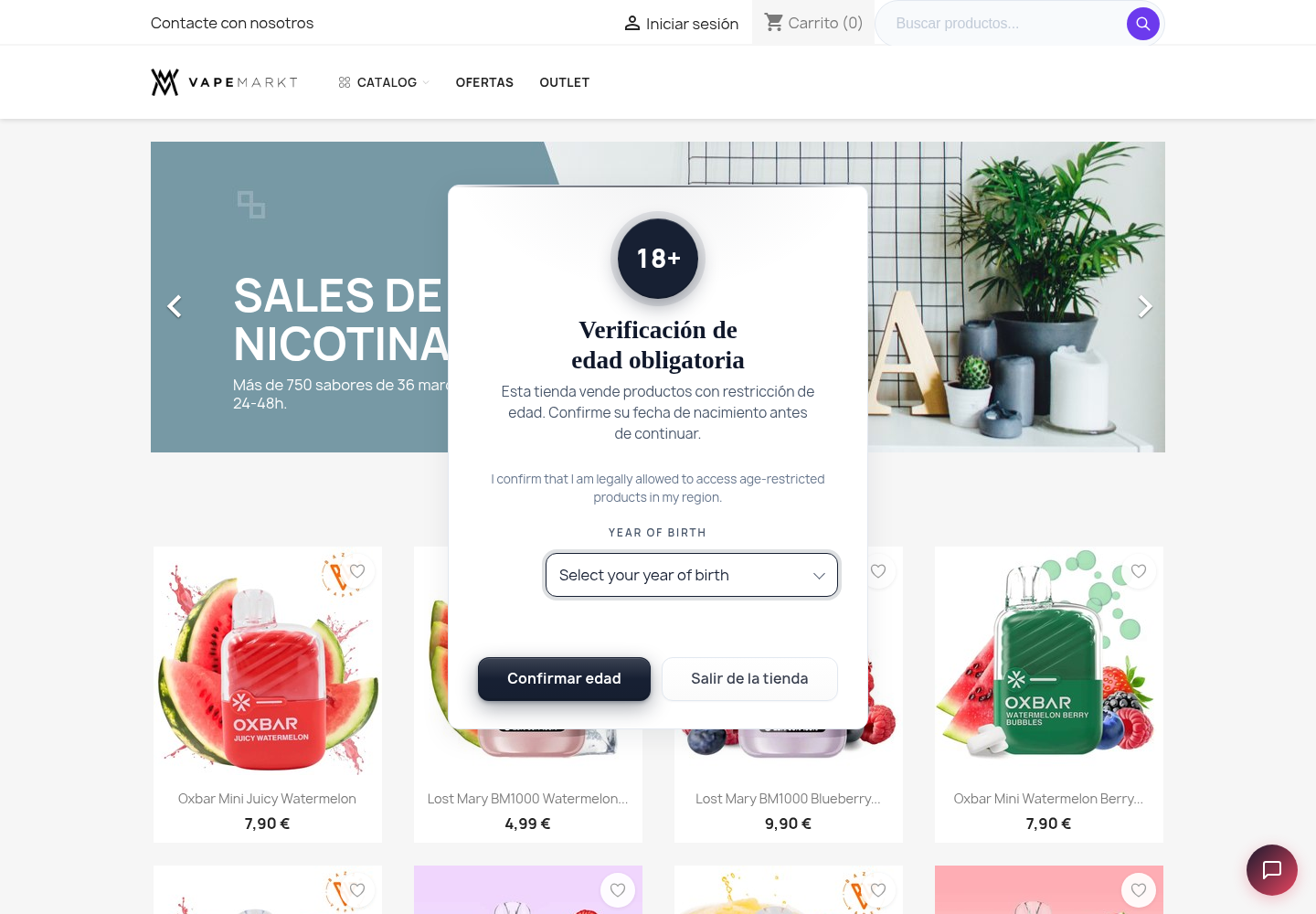 Method: Birth-year dropdown — captures year without month/day friction, mid-strictness option.
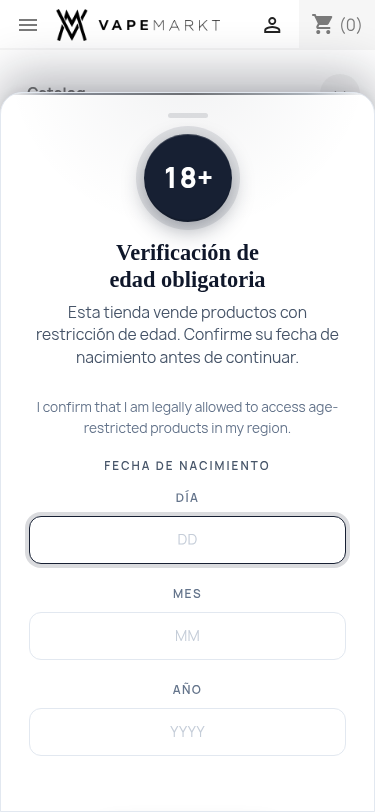 Mobile bottom-sheet layout — slides up from the bottom with a drag handle, larger tap targets, optimised for thumb-reach.
5. Layout Modes
Five layout modes let you control how the gate appears. All non-inline modes automatically convert to a bottom sheet on mobile viewports (below 768 px) for a native-feeling mobile experience.
| Mode | Desktop | Mobile | Best for |
|---|---|---|---|
| Center modal | Centered dialog overlay | Bottom sheet | Default — balanced visibility and UX |
| Fullscreen | Full-viewport panel | Bottom sheet | Adult stores, gambling — impossible to miss |
| Side panel | Right-anchored drawer | Bottom sheet | Stores wanting a slide-in UX |
| Bottom sheet | Bottom-anchored sheet | Native bottom sheet | Mobile-first stores |
| Inline embed | In-flow region, no overlay | Same | Embedding the gate inside a specific page section |
max-height: min(92vh, 720px) and overscroll-behavior-y: contain. It includes a drag handle element for native mobile feel.
6. Themes & Brand Palette
Six preset themes cover most stores out of the box. All meet WCAG 2.1 AA contrast requirements.
- Minimal — clean white card, subtle shadow. Default for most stores.
- Luxury Dark — gold-on-charcoal palette for premium spirits, cigars, vape boutiques.
- Glassmorphism — frosted translucent panel, modern feel.
- Neon — purple accent on near-black, suits cyber/edgy brands.
- Soft Gradient — pastel multi-stop background.
- Brand Auto — enter a single hex color and the module generates a full palette (background, text, accent, error, success) that meets WCAG AA contrast. No CSS skills needed.
Custom CSS
Paste any CSS into the Custom CSS field in the admin form. It is injected scoped under .np-ageverify. Unsafe tokens (<script>, expression()) are automatically stripped.
Dark mode
The Minimal, Glassmorphism, Brand Auto, and Soft Gradient themes automatically switch palettes when the visitor’s OS is in dark mode. Luxury Dark and Neon stay dark in both modes by design.
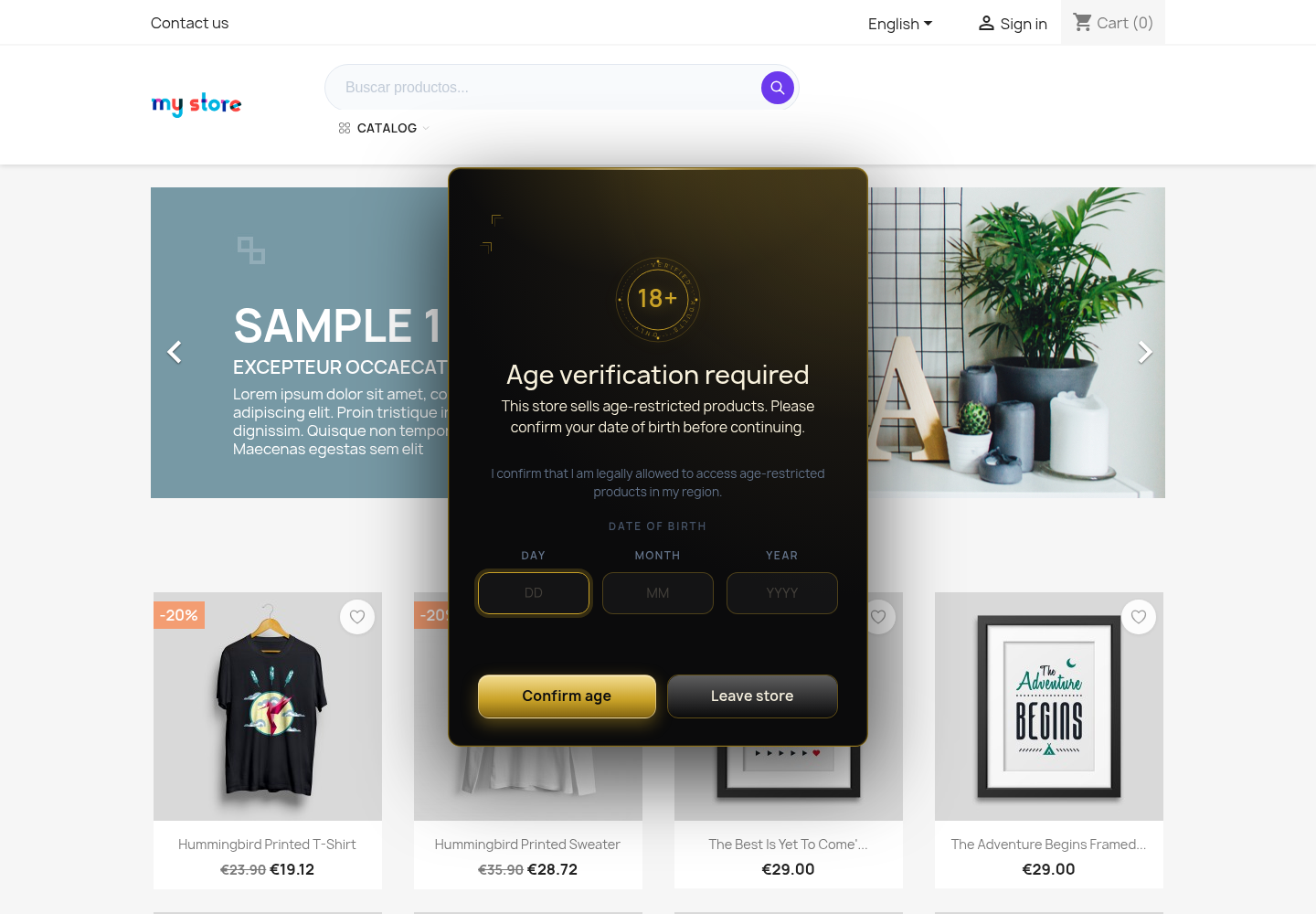 Theme: Luxury Dark — gold-on-charcoal palette with gilded badge and sheen-over-charcoal CTA.
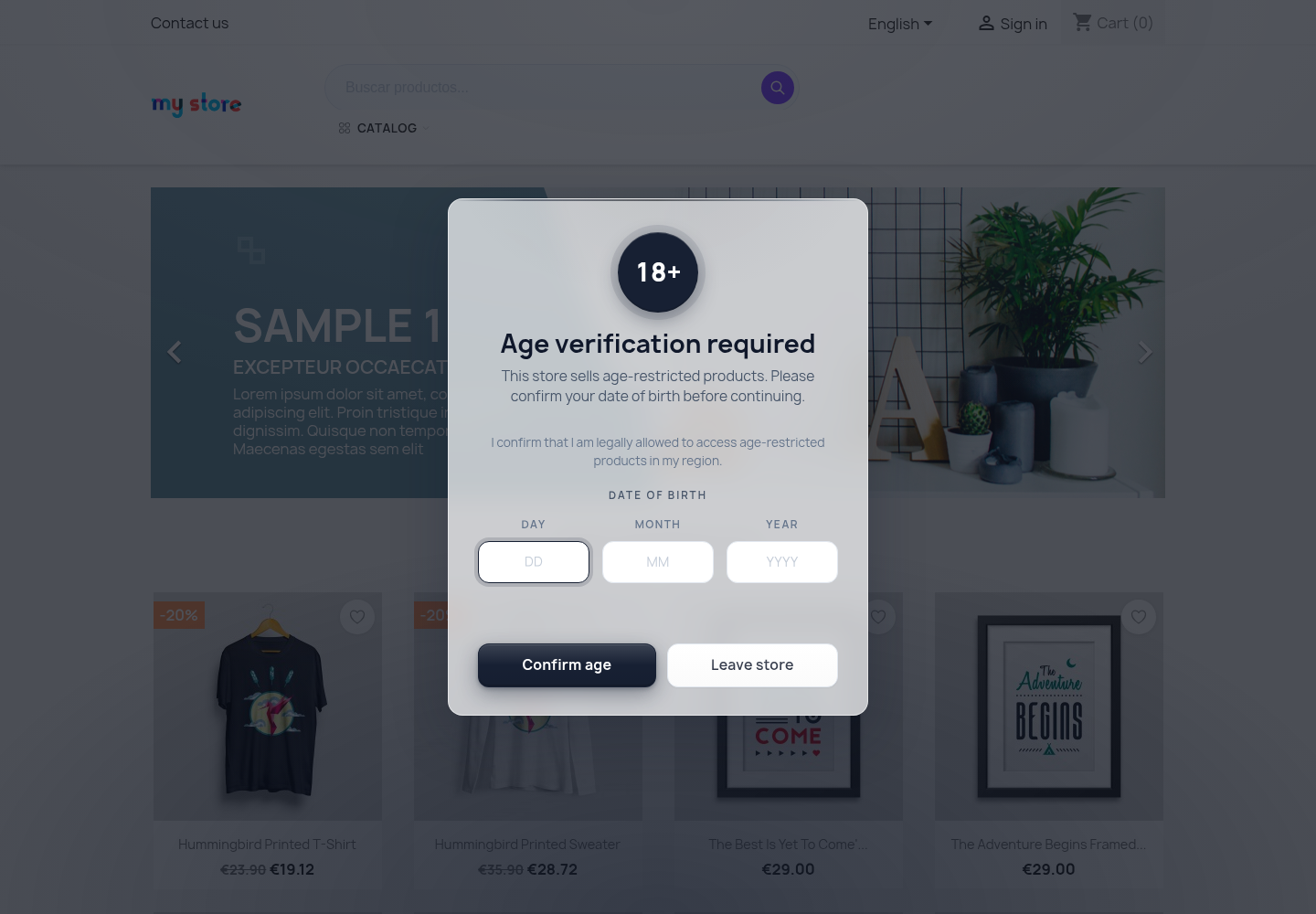 Theme: Glassmorphism — frosted translucent panel with backdrop saturation.
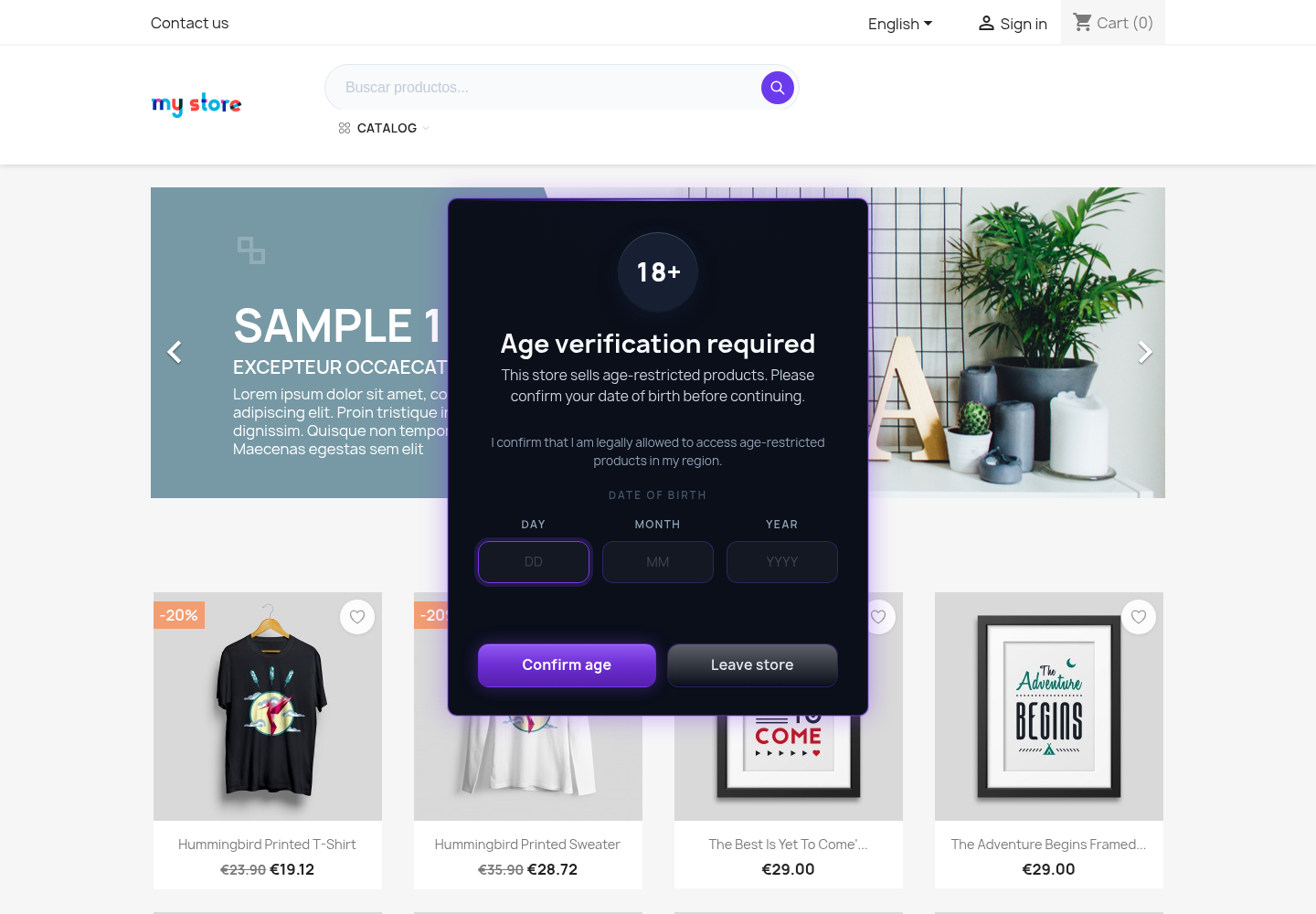 Theme: Neon — purple accent on near-black, suits cyber/edgy brands.
7. Gate Icons & Background Effects
Gate header icons
Choose from seven built-in SVG industry icons displayed at the top of the gate panel:
- Alcohol, Tobacco, Shield, CBD, Gaming, 18+, 21+
- Upload a custom SVG or PNG via URL
- Or set to None for a text-only gate
Icons inherit the theme’s color scheme via currentColor and are marked aria-hidden="true".
Background overlay effects
Configure the overlay behind the gate panel. Intensity is adjustable from 0 to 100%.
| Effect | Technique | Fallback |
|---|---|---|
| Blur | backdrop-filter: blur() | Solid dark overlay |
| Dim | Semi-transparent dark overlay | N/A (pure CSS) |
| Pixelate | Blur + contrast + pixelated | Solid dark overlay |
| Gradient | Colored gradient + light blur | Gradient without blur |
| None | Transparent | N/A |
8. Per-Category & Per-Product Restriction
If your catalogue mixes regulated and unregulated products, gate only what needs gating.
Per-category restriction
Switch scope to “Restricted”
In Settings → Restriction mode, change from Storewide to Restricted.
Pick the categories
Tick every category that contains regulated products. The gate triggers when a shopper opens a product page, category page, or has any cart item that belongs to one of these categories.
Save and validate
Open a non-restricted product in a private window — no gate. Open a restricted product — gate appears.
Per-product age tiers
Override the category-level minimum age on individual products. Use the per-product age tiers field (JSON or comma pairs) to set specific minimum ages — for example, 18 for beer and 21 for spirits within the same category.
When multiple rules match (category, product, GeoIP), the module applies the highest applicable minimum age.
9. GeoIP Country Rules
For international stores where legal minimum ages vary by country.
Enable GeoIP
Toggle GeoIP on in the module configuration.
Define country rules
Enter a JSON map of ISO2 country codes to minimum ages, for example: {"US": 21, "DE": 16, "FR": 18, "GB": 18}
Country detection
The module checks Cloudflare (CF-IPCountry), Apache (GEOIP_COUNTRY_CODE), Nginx headers, or a GeoLite2 database. If the visitor’s country is not in the map, the store’s default minimum age applies.
10. Checkout Enforcement
The storefront gate is the first guard. The checkout guard is the second — and it is what your payment processor cares about.
checkout_blocked event is recorded in the audit log with the cart ID, customer ID and minimum age11. Anti-Bruteforce Rate Limiting
Prevents minors from repeatedly guessing dates or clicking through the gate.
12. Audit Log & Analytics
Open the Audit log tab from the configuration page.
view, pass, fail, underage, and checkout_blocked event is recorded with timestamp, hashed IP, hashed user-agent, rule context, and minimum age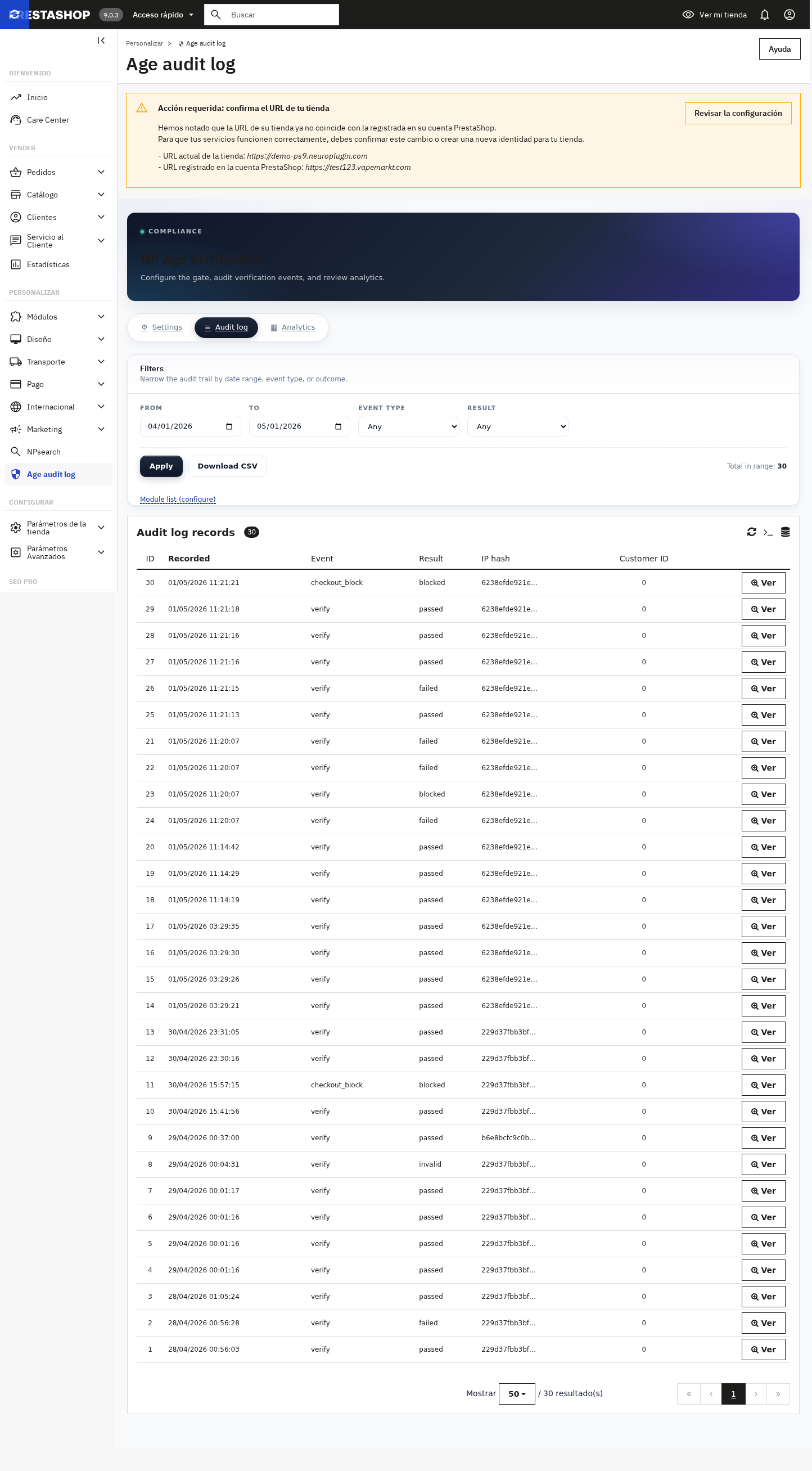 Audit log tab — date / event / result filters, CSV export, scrollable record list with status chips.
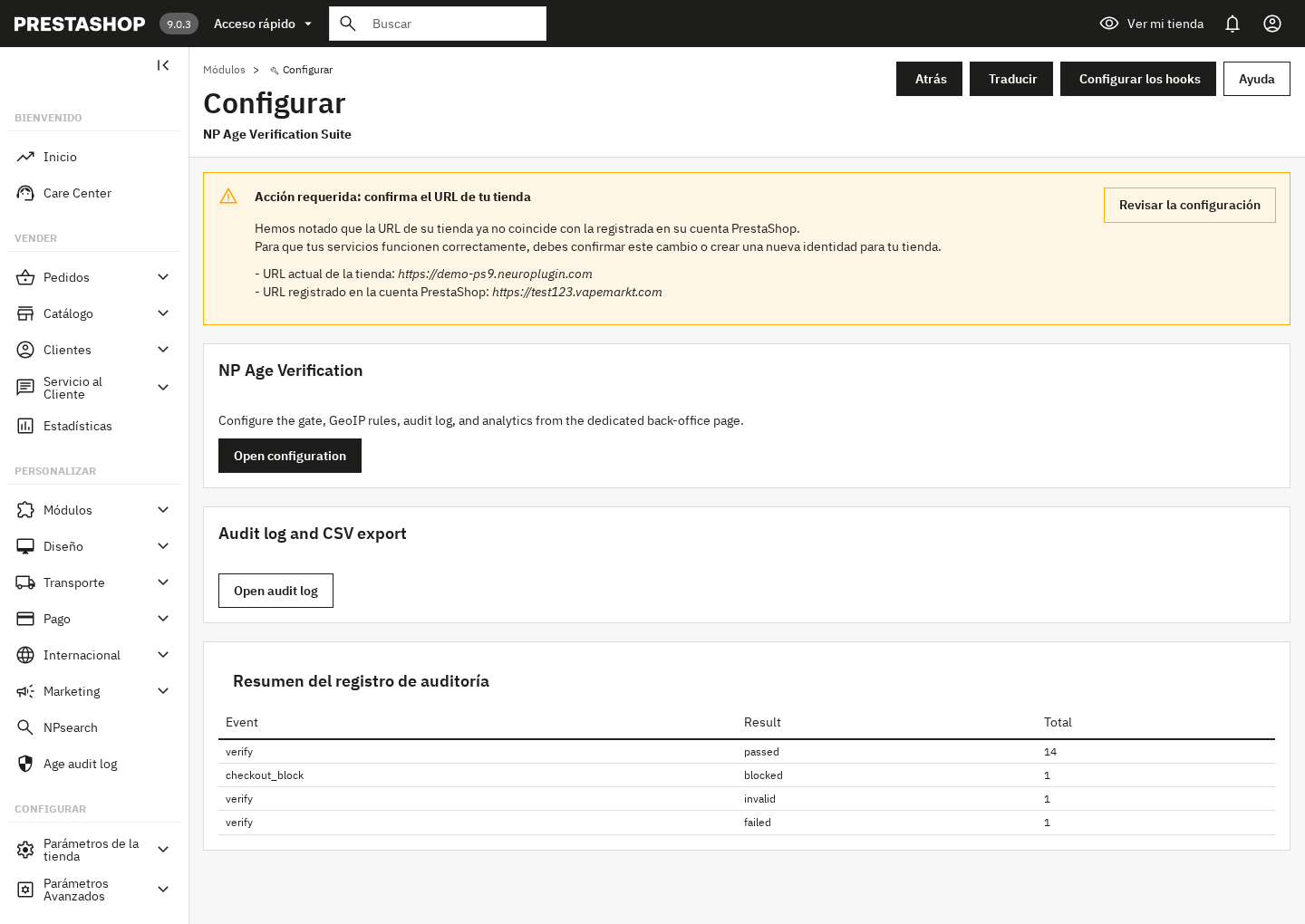 Module configure page — entry points into the dedicated Settings, Audit log, and Analytics tabs.
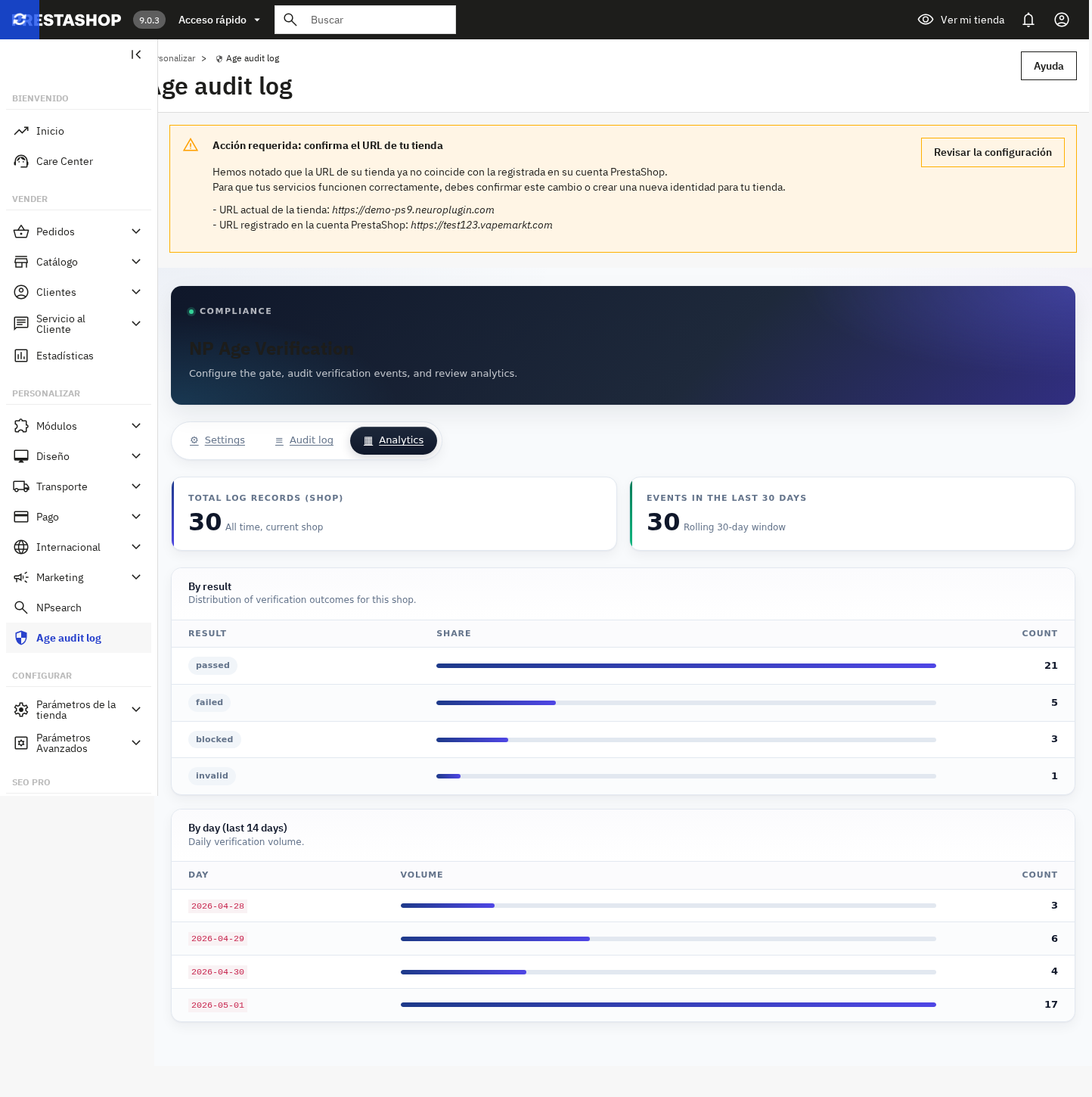 Analytics tab — KPI cards for total & 30-day, distribution by result with inline bars, 14-day daily volume timeline.
13. Translations
English and Spanish are bundled. Every storefront string is translatable through PrestaShop’s standard translation interface.
Open International → Translations
Pick Type of translation = “Installed module translations”, language = your target, then choose NP Age Verification Suite.
Translate strings
The two relevant domains are Modules.Npageverify.Shop (storefront strings: title, message, buttons, errors) and Modules.Npageverify.Admin (back-office labels).
Per-language consent text
The consent / disclaimer field in Settings supports the active language picker — switch language at the top of the back office before editing to set per-language copy.
14. Accessibility & Web Vitals
NP Age Verification Suite meets WCAG 2.1 AA requirements and is designed for minimal Web Vitals impact.
Accessibility
role="dialog" aria-modal="true" for overlays; role="region" for inline embedtouch-action: manipulation on all buttonsprefers-reduced-motion: reduce disables all animations and transitionsWeb Vitals
min-height on the gate root prevents layout shiftdata-nosnippet on gate DOM15. Frontoffice Validation Checklist
Run this checklist after configuration. It mirrors what the audit team replays before signing off.
16. All Screenshots
A reference gallery of every gate variant and back-office screen.
Storefront — verification methods
Date-of-birth — desktop, PrestaShop 9, default minimal theme.
“I am 18+” checkbox — single acknowledgment.
Yes / No buttons — fastest two-tap path.
Birth-year dropdown — captures year only.
Storefront — themes
Luxury Dark — gilded badge, charcoal panel, gold-gradient CTA.
Glassmorphism — frosted translucent panel.
Neon — purple accent on near-black panel.
Storefront — mobile & PS8
Mobile bottom-sheet — drag handle, larger tap targets, thumb-reach optimised.
 PrestaShop 8 — same gate UX, validated on PS 8.x storefronts.
Back office
Settings — gate behaviour, look & feel, storefront copy in premium card sections.
Audit log — filters, CSV export, status-chipped record list.
Module configure page — direct access to the suite tabs from PrestaShop Module Manager.
Analytics — KPI cards, distribution by result with inline bars, 14-day daily volume timeline.
17. License & Support
License
- Single domain: each license covers one PrestaShop installation (one domain). Multistore (multiple shops on the same installation) is included.
- Updates: 12 months of update access from purchase date. After expiry, you keep the last downloaded version.
- Support: 6 months of email support from purchase date.
- Modification: you may modify the module for your own use. Modified versions are not eligible for support.
- Redistribution: the module may not be redistributed, resold, or shared with third parties.
Support scope
- Included: installation, configuration, module bugs, multistore setup, GeoIP configuration, upgrade assistance
- Not included: custom theme development, third-party module conflicts, server configuration, legal / compliance advice
- Contact: support@neuroplugin.com — response within 2 business days
Refund policy
14-day refund if the module does not function as described on a standard, unmodified PrestaShop 8 or 9 installation. Contact support@neuroplugin.com with your order number, PrestaShop version, PHP version, and a description of the issue.
Compliance disclaimer
NP Age Verification Suite is a software tool that helps merchants present age-verification interfaces. It performs self-declared verification (date of birth, checkbox, yes/no, or birth-year). It does not verify identity documents, perform biometric checks, or connect to government databases. Merchants must determine what measures their jurisdiction requires. The audit log provides evidence of verification events, not legal certification. Neuroplugin does not provide legal advice.
18. Troubleshooting
Gate appears every page reload, even after I verified
Cookies are blocked or the cookie lifetime is set to 0. Check your CMP / cookie banner is not stripping the session cookie, and confirm the lifetime in Settings is > 0.
Gate flashes briefly then disappears (FOUC)
Theme critical CSS is loading after the gate CSS. The gate already inlines a min-height:100dvh hint to limit CLS. If you still see flicker, dequeue the theme’s late-loading CSS or move the gate CSS preload before the LCP element.
Audit log is empty even though I verified
Verify your PrestaShop instance has write permission on the ps_np_ageverify_log table and that the active shop ID matches the back-office shop selector. Multistore installs sometimes write to a different shop_id than the one you are viewing.
“Network error. Please try again.”
The verify endpoint is being blocked by a WAF or CSP. Whitelist /module/np_ageverify/verify for POST. The endpoint is same-origin, no third-party calls.
Mobile bottom-sheet does not appear, only modal
The bottom-sheet styling is gated at max-width: 767px. Confirm the viewport meta is present in your theme: <meta name="viewport" content="width=device-width, initial-scale=1">.
GeoIP is not detecting my country
GeoIP requires server-side country detection. The module checks Cloudflare (CF-IPCountry), Apache (GEOIP_COUNTRY_CODE), Nginx headers, or a GeoLite2 database. If none are available on your hosting, detection falls back to the store’s default minimum age. Contact your hosting provider about enabling GeoIP headers.
Rate limiting locked me out during testing
Rate limiting is per hashed IP. Wait for the cooldown period to expire, or temporarily disable rate limiting in the module configuration while testing.
Brand Auto palette looks wrong
The auto-palette generates colors from a single brand hex value. If the result looks off, try a different brand color with more saturation. The palette preview in the admin form shows the generated colors with their contrast ratios before you save.